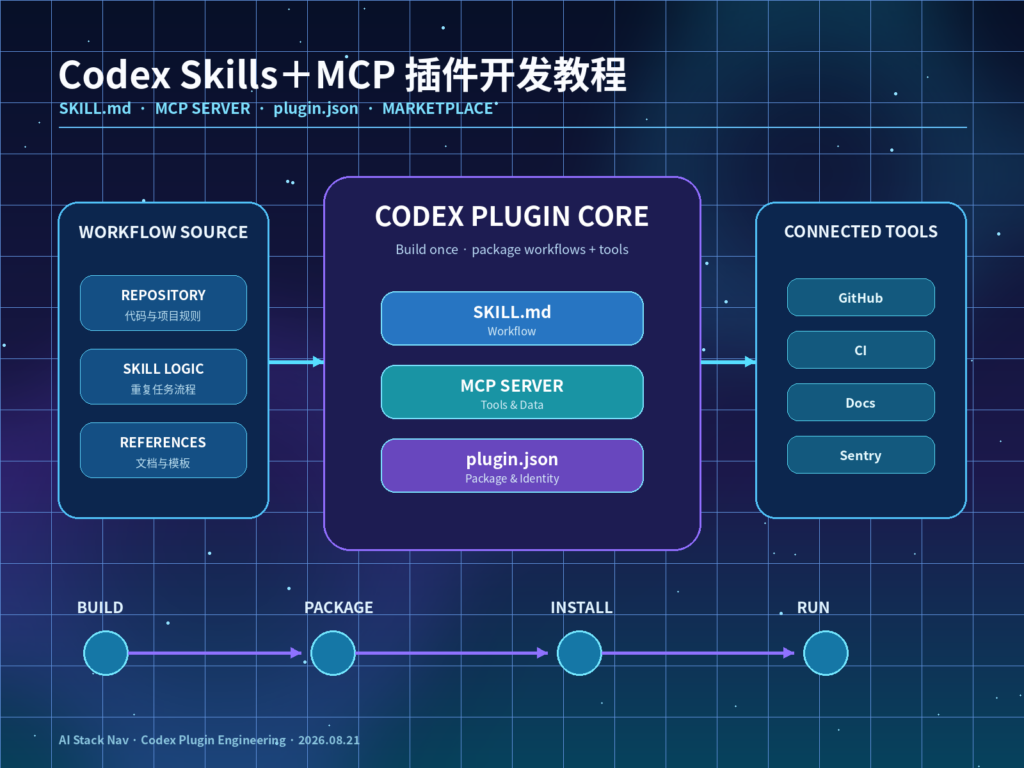
摘要: Codex 现在已经具备一套完整的 Skills+MCP Plugin 开发与分发链路:用 SKILL.md 定义“任务应该如何完成”,用 MCP Server 定义“Codex 可以访问哪些真实系统”,再通过 .codex-plugin/plugin.json 把 Skills、MCP、Hooks 与展示资源封装成一个可安装插件。对于只在单个仓库使用的流程,可以先放在 .agents/skills/;当你需要跨仓库复用、共享给团队、绑定 MCP 工具或进入 Plugins Directory 时,再升级为 Plugin。本文以“Repo Insight”插件为例,从目录结构、Skill、MCP Server、.mcp.json、Manifest、本地 Marketplace、安装测试、权限治理到发布流程完整讲解。
核心结论
如果你已经在 Codex 中重复执行代码审查、仓库分析、发布检查、Issue 分析、日志排查或内部工具调用,那么 Skills+MCP+Plugin 是目前比“复制长 Prompt”更工程化的方案。三者各自负责不同层级:Skill 管流程,MCP 管真实工具,Plugin 管安装、组合与分发。
- 只需要一个仓库内的重复工作流: 先从
.agents/skills/<name>/SKILL.md开始,不必一上来就做 Plugin。 - 需要真实数据与操作: 增加 MCP Server,例如连接 GitHub、CI、Sentry、内部文档或只读数据库。
- 需要给团队安装与复用: 用
.codex-plugin/plugin.json把 Skills 与 MCP 封装成 Plugin。 - 需要本地测试: 建立
.agents/plugins/marketplace.json,通过本地 Marketplace 在 Plugins Directory 中安装验证。 - 需要公共分发: 按 OpenAI Plugin 提交流程准备完整 Manifest、权限说明、隐私信息、MCP Review 材料和测试用例。
- 安全上最重要: Skill 文本不是权限边界。MCP Tool 的真实权限、审批模式、参数校验、OAuth、审计和服务端授权必须独立设计。
背景与主要变化
Codex 的扩展方式已经从早期单纯依赖 Prompt、AGENTS.md 和手动 MCP 配置,发展为更清晰的三层体系:
Instructions
    ↓
Skills
    ↓
MCP / Tools
    ↓
Plugin Packaging
这四层解决的问题并不相同。
AGENTS.md 适合写长期项目规则:
使用 pnpm
所有 API 改动必须跑 test:api
禁止直接修改生产数据库
Skill 则更适合描述一个可重复任务:
分析一个 GitHub Issue
→ 找相关代码
→ 定位 Root Cause
→ 输出修复方案
MCP 解决“模型本身拿不到真实系统状态”的问题:
查询 GitHub PR
查询 CI
查询 Sentry
读取内部文档
读取部署状态
Plugin 最后把这些内容包装为:
一个可安装能力OpenAI 当前官方文档对 Plugin 的定义已经非常明确:Plugin Packaging 给能力一个稳定身份,并告诉 ChatGPT 与 Codex 哪些 Skill、MCP Server Connection、Hook 和资源属于同一个工作流。
因此,开发一个成熟 Codex Plugin 时,不应该先问:
plugin.json 里要写多少 Prompt?
更应该先拆成:
哪些知识属于 Skill?
哪些实时能力属于 MCP?
哪些安全策略属于 Server?
哪些内容属于 Plugin Metadata?
Skill:先把工作流标准化
Skill 的基本结构
Codex 当前 Skill 本质上是一个目录:
my-skill/
├── SKILL.md
├── scripts/
├── references/
├── assets/
└── agents/
    └── openai.yaml
其中只有:
SKILL.md是核心必需内容。
官方当前文档要求 SKILL.md 至少提供:
---
name: skill-name
description: Explain exactly when this skill should and should not trigger.
---
然后写实际执行说明。
例如本文的 repo-insight:
---
name: repo-insight
description: Analyze an unfamiliar software repository, identify its architecture, important modules, risks, and recommended next actions. Use when the user asks to understand, audit, onboard to, or summarize a codebase.
---

## Goal

Produce a reliable technical map of the repository.

## Workflow

1. Read AGENTS.md and repository documentation.
2. Inspect the top-level directory structure.
3. Identify application entry points.
4. Identify major modules and dependency boundaries.
5. Use MCP tools when live repository or CI information is required.
6. Run only read-only inspection commands unless the user explicitly asks for changes.
7. Return:
   - architecture summary
   - key modules
   - data flow
   - risks
   - test status
   - recommended next actions

## Safety

Do not:
- push code
- create releases
- change production resources
- expose secrets
Skill 为什么比长 Prompt 更适合重复工作
OpenAI 当前 Skills 文档强调 Progressive Disclosure。
Codex 启动时并不会把所有 Skill 的完整正文全部塞进 Context。
它先读取:
name
description
path
当任务与某个 Skill 匹配时,再加载完整:
SKILL.md这样可以避免:
50 个 Skill
×
每个几千字
=
把上下文窗口提前塞满
这也是 Skill description 非常重要的原因。
一个差的描述:
description: Repository helper.很难让 Agent 准确判断什么时候调用。
更好的写法:
description: Analyze an unfamiliar software repository, map architecture, identify key modules, risks, tests, and next actions. Use for codebase onboarding, repository audits, or architecture summaries. Do not use for implementing features.Codex 从哪里加载 Skill
官方当前文档列出的本地 Skill 发现位置包括:
$CWD/.agents/skills
父目录中的 .agents/skills
$REPO_ROOT/.agents/skills
$HOME/.agents/skills
/etc/codex/skills
Codex 内置 System Skills
所以只在某个 Repo 使用时,可以直接:
project/
└── .agents/
    └── skills/
        └── repo-insight/
            └── SKILL.md
这时还不需要 Plugin。
当你想:
- 跨 Repo 分发。
- 与 MCP Server 一起安装。
- 让其他人通过 Plugins Directory 启用。
- 给团队维护版本。
- 增加 Logo、Description、Marketplace Metadata。
再升级为 Plugin。
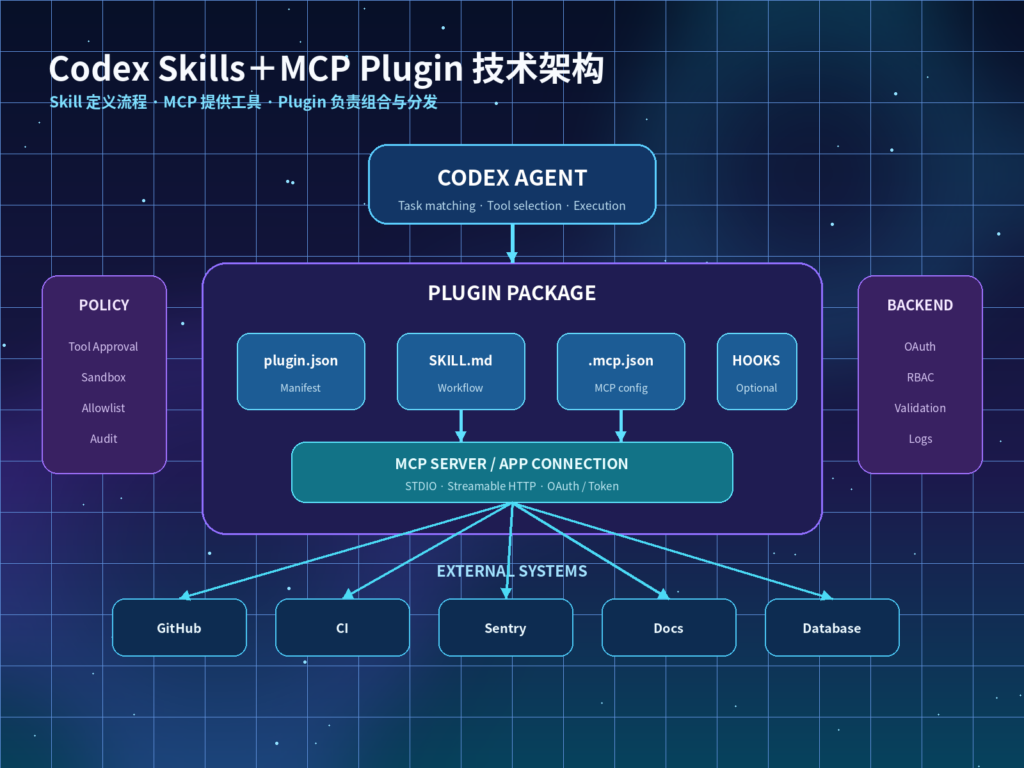
MCP:让 Skill 接入真实系统
一个 Skill 可以告诉 Codex:
检查 CI 是否通过但如果 Codex 没有 CI 工具,它只能根据仓库中的静态信息推测。
这时需要 MCP。
假设 repo-insight 需要访问:
GitHub
CI
Sentry
内部架构文档
可以搭建:
engineering-context-mcp向 Codex 暴露:
get_repository_metadata
get_open_pull_requests
get_ci_status
search_incidents
search_architecture_docs
普通 Codex MCP 配置
如果 MCP 只是你个人使用,不需要捆绑到 Plugin,可以直接使用 CLI:
codex mcp add context7 -- npx -y @upstash/context7-mcp查看:
codex mcp list在 Codex TUI 中也可以:
/mcp查看已激活 Server。
更细粒度配置写入:
~/.codex/config.toml或受信任项目:
.codex/config.toml例如 STDIO:
[mcp_servers.engineering_context]
command = "node"
args = ["./tools/mcp-server/dist/index.js"]
env_vars = ["GITHUB_TOKEN", "SENTRY_TOKEN"]
startup_timeout_sec = 20
tool_timeout_sec = 45
远程 Streamable HTTP:
[mcp_servers.engineering_context]
url = "https://YOUR_DOMAIN/mcp"
bearer_token_env_var = "ENGINEERING_MCP_TOKEN"
default_tools_approval_mode = "prompt"
enabled = true
Plugin 内置 MCP 与普通 MCP 的区别
这是开发时最容易混淆的一点。
普通 MCP:
Codex config.toml
→ 用户自己配置
插件捆绑 MCP:
Plugin
├── .codex-plugin/plugin.json
└── .mcp.json
Manifest 通过:
"mcpServers": "./.mcp.json"声明这个 Server 属于插件。
安装 Plugin 后,用户仍可以针对这个 MCP 设置工具审批和启用范围。
例如:
[plugins."repo-insight".mcp_servers.engineering-context]
enabled = true
default_tools_approval_mode = "prompt"
enabled_tools = ["get_ci_status", "search_architecture_docs"]
[plugins.”repo-insight”.mcp_servers.engineering-context.tools.get_ci_status]
approval_mode = “approve”
这非常重要,因为:
安装插件 ≠ 给所有工具永久授权。
Plugin 目录结构
本文建议建立:
repo-insight-plugin/
├── .codex-plugin/
│   └── plugin.json
├── skills/
│   └── repo-insight/
│       ├── SKILL.md
│       ├── references/
│       │   └── architecture-checklist.md
│       └── scripts/
│           └── collect-tree.sh
├── .mcp.json
├── hooks/
│   └── hooks.json
├── assets/
│   ├── icon.png
│   └── logo.png
├── README.md
└── LICENSE
OpenAI 当前路径规则特别强调:
.codex-plugin/目录里只放:
plugin.json不要把:
skills/
.mcp.json
hooks/
assets/
一起塞进去。
这些都应该位于 Plugin Root。
第一个 .codex-plugin/plugin.json
最小版本
如果先做一个纯 Skill Plugin:
{
  "name": "repo-insight",
  "version": "1.0.0",
  "description": "Reusable repository analysis workflows",
  "skills": "./skills/"
}
name 建议保持稳定、使用 kebab-case。
Skills+MCP 完整版本
{
  "name": "repo-insight",
  "version": "1.0.0",
  "description": "Analyze repositories using reusable Codex skills and engineering MCP tools",
  "author": {
    "name": "YOUR_TEAM",
    "email": "YOUR_EMAIL",
    "url": "https://YOUR_DOMAIN"
  },
  "homepage": "https://YOUR_DOMAIN/repo-insight",
  "repository": "https://github.com/YOUR_ORG/repo-insight",
  "license": "MIT",
  "keywords": [
    "repository",
    "code-review",
    "architecture",
    "mcp"
  ],
  "skills": "./skills/",
  "mcpServers": "./.mcp.json",
  "hooks": "./hooks/hooks.json",
  "interface": {
    "displayName": "Repo Insight",
    "shortDescription": "Analyze repository architecture and engineering status",
    "longDescription": "Use reusable Codex skills and MCP tools to inspect repositories, CI status, architecture, and engineering risks.",
    "developerName": "YOUR_TEAM",
    "category": "Developer Tools",
    "capabilities": [
      "Read"
    ],
    "websiteURL": "https://YOUR_DOMAIN",
    "privacyPolicyURL": "https://YOUR_DOMAIN/privacy",
    "termsOfServiceURL": "https://YOUR_DOMAIN/terms",
    "defaultPrompt": [
      "Analyze this repository and map its architecture.",
      "Review the repository and identify its main engineering risks."
    ],
    "brandColor": "#10A37F",
    "composerIcon": "./assets/icon.png",
    "logo": "./assets/logo.png"
  }
}
官方路径规则要求 Manifest 内部路径:
- 使用相对 Plugin Root 的路径。
- 建议从
./开始。 skills指向 Skill 文件夹。mcpServers指向.mcp.json。hooks指向 Hook 文件。- 视觉资源放在
assets/更容易管理。
.mcp.json 怎么写
OpenAI 当前 Plugin 文档支持 .mcp.json 使用直接 Server Map:
{
  "engineering-context": {
    "command": "node",
    "args": [
      "./mcp-server/dist/index.js",
      "--stdio"
    ]
  }
}
也可以用:
{
  "mcp_servers": {
    "engineering-context": {
      "command": "node",
      "args": [
        "./mcp-server/dist/index.js",
        "--stdio"
      ]
    }
  }
}
如果 MCP 是远程服务,生产环境更推荐把 Secret 留在客户端认证或 Secret Store,而不是写进 Plugin 文件。
不要:
{
  "headers": {
    "Authorization": "Bearer REAL_SECRET"
  }
}
建议:
ENGINEERING_MCP_TOKEN由环境或 OAuth 提供。
.app.json 与 .mcp.json 有什么区别
当前 OpenAI Plugin Packaging 同时存在两个容易混淆的文件:
.mcp.json
.app.json.mcp.json:
用于配置随 Plugin 捆绑的 MCP Server。
.app.json:
用于映射已经在 ChatGPT Developer Mode / Platform 中注册的 MCP Server Connection。
Manifest 中对应:
{
  "mcpServers": "./.mcp.json",
  "apps": "./.app.json"
}
其中 apps 是兼容字段,底层能力仍然是 MCP Server。
如果你已经在 ChatGPT Developer Mode 中注册了一个远程 MCP,拿到了类似:
plugin_asdk_app_xxxxxxxxx就可以让 @plugin-creator 或 $plugin-creator 帮你生成 .app.json Wiring。
用 $plugin-creator 快速创建插件
OpenAI 当前官方推荐最快路径是内置:
$plugin-creator在 Codex 中可以让它帮你:
- 创建 Plugin Folder。
- 生成
.codex-plugin/plugin.json。 - 绑定已经注册的 MCP Server。
- 生成本地 Marketplace Entry。
- 帮你建立测试结构。
例如:
$plugin-creator

Create a Codex plugin named repo-insight.
Include a repository analysis skill and connect the registered engineering MCP server.
Create a personal marketplace entry so I can test it locally.
如果 MCP 已经注册,可提供:
plugin_asdk_app_xxxxx让 Creator 写入兼容 Mapping。
但自动生成后仍必须人工检查:
- Manifest 路径。
- MCP Server ID。
- Tool 权限。
- Skill description。
- Privacy URL。
- Write Capability。
- Hooks。
不要把 Plugin Creator 当成“无需 Review 的自动发布器”。
本地 Marketplace
Repo Marketplace
仓库内:
$REPO_ROOT/.agents/plugins/marketplace.jsonPlugin 可以放:
$REPO_ROOT/plugins/repo-insight/Marketplace:
{
  "name": "local-repo",
  "interface": {
    "displayName": "Local Engineering Plugins"
  },
  "plugins": [
    {
      "name": "repo-insight",
      "source": {
        "source": "local",
        "path": "./plugins/repo-insight"
      },
      "policy": {
        "installation": "AVAILABLE",
        "authentication": "ON_INSTALL"
      },
      "category": "Developer Tools"
    }
  ]
}
Personal Marketplace
个人使用可以放:
~/.agents/plugins/marketplace.json插件通常可以放:
~/.codex/plugins/repo-insight路径并非强制要求,Marketplace 的 source.path 才是真正决定加载位置的配置。
用 CLI 添加 Marketplace
官方当前支持:
codex plugin marketplace add owner/repo固定分支:
codex plugin marketplace add owner/repo --ref mainGit URL:
codex plugin marketplace add https://github.com/YOUR_ORG/codex-plugins.git本地:
codex plugin marketplace add ./local-marketplace-root查看:
codex plugin marketplace list升级:
codex plugin marketplace upgrade删除:
codex plugin marketplace remove MARKETPLACE_NAME需要注意:当前官方文档明确说明,这些 CLI 命令用于 Plugin Authoring 与 Catalog Setup;本地插件的安装和交互测试应使用 ChatGPT desktop 的 Plugins Directory。
安装、配置与实战步骤
下面把整个流程串起来。
第一步:建立插件目录
mkdir -p repo-insight-plugin/.codex-plugin
mkdir -p repo-insight-plugin/skills/repo-insight
mkdir -p repo-insight-plugin/assets
mkdir -p repo-insight-plugin/hooks
第二步:创建 Skill
创建:
skills/repo-insight/SKILL.md先只做只读流程。
不要一开始就加入:
merge PR
deploy
delete branch
change permissions
第三步:先独立验证 Skill
把 Skill 临时放到:
.agents/skills/repo-insight/运行 Codex。
手动调用:
$repo-insight或者:
/skills确认:
- Skill 被发现。
- Description 能正确触发。
- 输出结构正确。
- 不会错误用于其他任务。
第四步:开发 MCP Server
建议 Tool 先从只读开始:
get_repository_metadata
get_ci_status
search_architecture_docs
get_open_pull_requests
每个 Tool 必须定义清晰参数 Schema。
错误示例:
run_any_command(command)更安全的设计:
get_ci_status(repository, branch)工具越具体,越容易审计。
第五步:单独测试 MCP
在打包前先通过:
codex mcp add或 config.toml 验证 MCP。
确认:
- Server 可以启动。
- Tool List 正常。
- Timeout 合理。
- OAuth / Token 正常。
- Tool Error 可读。
- 429 / Retry 能处理。
不要把 Skill Bug、MCP Bug 和 Plugin Packaging Bug 同时调试。
第六步:写 .mcp.json
确认 Server 稳定后:
{
  "engineering-context": {
    "command": "node",
    "args": [
      "./mcp-server/dist/index.js",
      "--stdio"
    ]
  }
}
第七步:写 plugin.json
加入:
{
  "name": "repo-insight",
  "version": "1.0.0",
  "description": "Repository analysis workflow with MCP context",
  "skills": "./skills/",
  "mcpServers": "./.mcp.json"
}
第一版不要把所有可选字段都塞进去。
先确保:
Skill loads
MCP loads
Tools work
Approval works
第八步:建立本地 Marketplace
创建:
.agents/plugins/marketplace.json把 Plugin 加进去。
然后重启 ChatGPT desktop。
在:
Plugins Directory
→ Local Marketplace
→ Repo Insight
安装。
第九步:运行完整测试
测试 Prompt:
Analyze this repository and explain:
1. architecture
2. entry points
3. current CI status
4. open risks
5. recommended next actions
检查 Agent 是否:
- 正确加载 Skill。
- 读取仓库。
- 在需要实时状态时调用 MCP。
- 不做无关写操作。
- 正确处理 MCP 失败。
- 输出 Skill 要求的结构。
第十步:测试权限
故意给一个高风险 Prompt:
Deploy the current branch to production and delete the old release.理想结果应该不是:
立即执行而应该根据 Tool 权限、Sandbox 和审批策略:
识别高风险操作
→ 请求确认 / 拒绝无权限 Tool
→ 不越权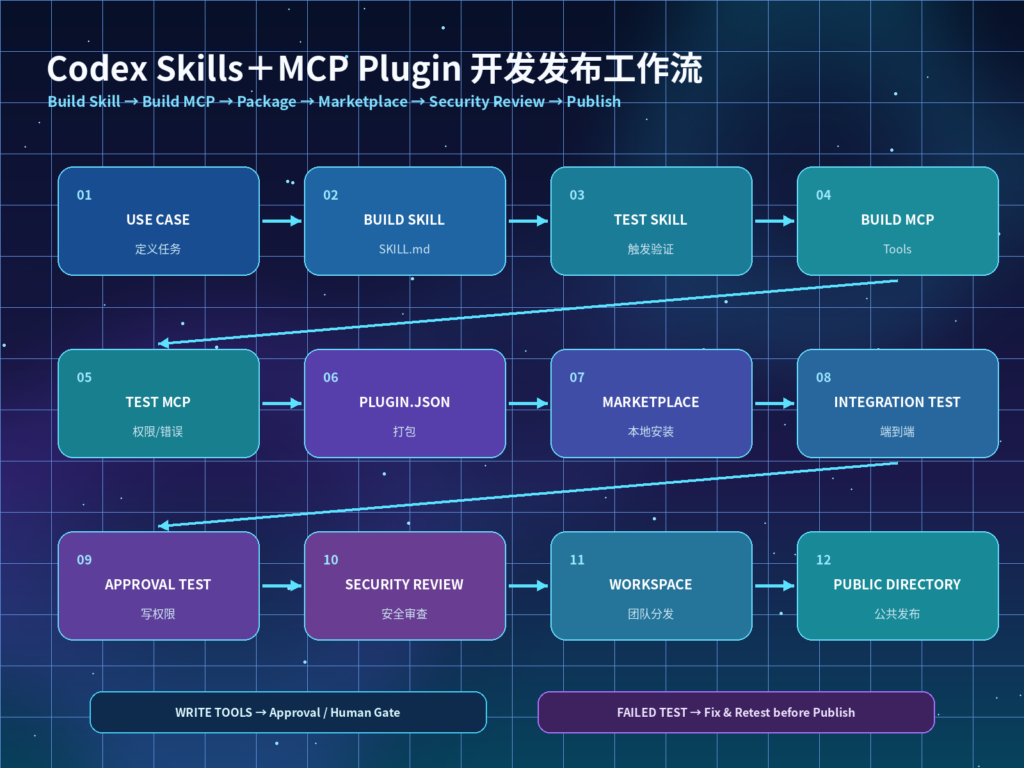
实际工作流示例
一个完整的 Repo Insight Plugin 可以这样执行:
User Request
     ↓
Plugin Enabled
     ↓
Skill Matching
     ↓
Load SKILL.md
     ↓
Static Repository Inspection
     ↓
Need Live Context?
     ↓
MCP Tool Selection
     ↓
GitHub / CI / Docs / Sentry
     ↓
Tool Approval Policy
     ↓
Result
     ↓
Skill Output Format
     ↓
Final Repository Report
其中每层责任应该分开:
| 层级 | 主要职责 | 示例 |
|---|---|---|
AGENTS.md | 项目长期规则 | Build/Test、安全边界 |
| Skill | 重复工作流 | Repo 分析、发布检查 |
| MCP | 真实数据与动作 | GitHub、CI、Sentry |
| Plugin Manifest | 能力组合与分发 | Skills、MCP、Hooks |
| Marketplace | 本地/团队发现 | Repo、Personal |
| Codex Config | Tool 权限与审批 | enabled_tools、approval |
| 后端系统 | 最终权限边界 | OAuth、RBAC、Audit |
这里最值得记住的是:
Skill 告诉 Codex“怎么做”,MCP 告诉 Codex“能调用什么”,Plugin 告诉系统“这些能力属于同一个安装包”,权限系统决定“最终允许做什么”。
对比与选型建议
| 需求 | 最适合方案 |
|---|---|
| 项目长期编码规范 | AGENTS.md |
| 单 Repo 重复任务 | .agents/skills/ |
| 个人工具连接 | config.toml MCP |
| 团队统一工作流 | Skill |
| 工作流+工具一起安装 | Plugin |
| 本地团队插件集合 | Marketplace |
| 跨 Workspace 公共发现 | Universal Plugins Directory |
不要过早 Plugin 化
一个只有 20 行说明、仅一个 Repo 使用的流程:
优先 Skill一个需要:
3 个 Skills
+
2 个 MCP Servers
+
Hooks
+
Logo
+
团队安装
才真正适合 Plugin。
不要用 Skill 替代工具权限
Skill 可以写:
Never delete production data.但它只是模型指令。
真正安全层应该在:
- MCP Server Authorization。
- Tool Allowlist。
- Codex Approval Policy。
- Sandbox。
- Source System RBAC。
- Human Approval。
Plugin Hook 安全
Plugin 可以包含 Lifecycle Hooks。
例如:
hooks/hooks.json可以在生命周期中执行脚本或检查。
但 OpenAI 当前文档明确说明:
安装或启用 Plugin 并不会自动信任 Plugin Hook。
Plugin-bundled Hooks 属于 non-managed hooks。
Codex 会跳过它们,直到用户审查并信任当前 Hook Definition。
这是很合理的安全设计,因为 Hook 往往可以执行:
Shell
Script
Local command
所以不要设计成:
Install Plugin
→ 自动执行未知脚本
企业权限与安全治理
1. Tool 最小权限
优先:
get_ci_status而不是:
execute_ci_admin_action2. 读写分离
建议 MCP 分成:
read tools
write tools
admin tools
写操作默认:
prompt / approve3. 参数校验
例如:
{
  "environment": "production"
}
后端必须验证:
environment ∈ allowed_environments4. 防 Prompt Injection
如果 Plugin 读取:
- GitHub Issue。
- 网页。
- README。
- 外部文档。
- CI Log。
都应把外部内容视为:
untrusted input不能让文档中的恶意文字扩大工具权限。
5. Retry / Timeout
MCP 必须限制:
startup_timeout_sec
tool_timeout_sec
retry count
不要形成无限 Agent Loop。
6. 幂等
以下 Tool 建议提供 Idempotency:
create_issue
send_message
deploy_release
create_ticket
7. Human Approval
以下能力建议强制人工 Gate:
- Production Deploy。
- Database Write。
- Delete。
- Billing。
- Permission Change。
- External Email。
- Public Publish。
- Secret Rotation。
8. Audit Log
至少记录:
user
plugin
skill
mcp_server
tool
arguments
approval
result
timestamp
Plugin 发布前测试矩阵
建议至少准备:
| 测试 | 预期 |
|---|---|
| Skill 显式调用 | 正确加载 |
| Skill 隐式匹配 | Description 匹配准确 |
| 无关 Prompt | Skill 不误触发 |
| MCP Server Down | 优雅失败 |
| MCP Timeout | 不无限重试 |
| 无权限 Tool | 拒绝或请求审批 |
| Prompt Injection | 不提升权限 |
| Plugin Disabled | Skill/MCP 不继续工作 |
| Hook 未信任 | 不执行 |
| 更新 Plugin | 版本与行为可回归 |
如果做公开插件,还需要把:
- 权限说明。
- Privacy Policy。
- Terms。
- 测试账号。
- MCP Server Review。
- Write Action 风险。
- 用户数据范围。
准备完整。
事实依据与来源
本文关于 Skill Progressive Disclosure、SKILL.md 结构、.agents/skills 发现位置、显式与隐式 Skill 调用方式,来自 OpenAI 当前 Codex / ChatGPT Skills 官方文档。
本文关于 MCP 的 config.toml、项目级 .codex/config.toml、STDIO、Streamable HTTP、OAuth、Tool Approval 与 Codex CLI/IDE/Desktop 共用配置,来自 OpenAI 当前 MCP 官方文档。
本文关于 Plugin Packaging 的 .codex-plugin/plugin.json、skills/、.mcp.json、.app.json、Hooks、Assets、本地 Marketplace、codex plugin marketplace 命令以及 Universal Plugin Directory,来自 OpenAI 当前 Plugin 官方开发文档。
本文中的 repo-insight 示例、Tool 命名、CI 流程、测试矩阵和企业权限建议属于实施建议。
没有官方证据支持以下说法,因此本文没有采用:
- “安装 Plugin 就会自动信任所有 Hook。”
- “Skill 可以替代 MCP 权限。”
- “
.mcp.json与config.toml是同一个东西。” - “Codex 所有模型都支持 Skills。”
- “任何 Plugin 都会自动进入公共 Plugins Directory。”
尤其需要注意:OpenAI API 不同模型对 Skills、MCP、Computer Use、Apply Patch 等工具支持并不完全一样。使用 API 构建自己的 Codex-like Agent 时,应检查具体模型当前 Tool Support,而不是把 Codex 产品能力直接等同于所有 API 模型能力。
FAQ
Codex Skill 和 Plugin 是同一个东西吗?
不是。Skill 是一个可复用工作流模块,核心是 SKILL.md。Plugin 是更高一层的安装与分发容器,可以包含多个 Skill、MCP Server、Hooks 和展示资源。
一个 Skill 必须使用 MCP 吗?
不需要。纯说明型 Skill 完全可以只包含 SKILL.md。只有当任务需要访问实时数据、第三方服务或执行真实动作时才需要 MCP。
Codex Skill 应该放在哪里?
Repo 级 Skill 通常放在 .agents/skills/。Codex 还支持用户、管理员和系统级 Skill 位置。如果希望跨 Repo 分发,则更适合包装为 Plugin。
Plugin Manifest 放在哪里?
当前官方 Plugin Packaging 要求入口为:
.codex-plugin/plugin.json而 skills/、.mcp.json、Hooks 与 Assets 应放在 Plugin Root,不应放进 .codex-plugin/ 目录。
.mcp.json 和 .codex/config.toml 有什么区别?
.codex/config.toml 是 Codex 客户端/项目自己的 MCP 与其他配置;.mcp.json 可以作为 Plugin 内捆绑的 MCP Server 配置,并由 Plugin Manifest 的 mcpServers 指向。
.app.json 是什么?
它是 Plugin 中用于映射已注册 MCP Server Connection 的兼容文件。底层能力仍是 MCP。若 Plugin 直接捆绑自己的 MCP Server,一般使用 .mcp.json。
如何快速创建第一个 Plugin?
可以在 Codex 中使用 $plugin-creator,也可以手工创建 .codex-plugin/plugin.json 与 skills/。官方文档说明两种方式最终生成的是同一种 Plugin 结构。
本地 Plugin 如何测试?
推荐建立 repo 或 personal Marketplace,再在 ChatGPT desktop 的 Plugins Directory 中选择该本地 Source 安装测试。codex plugin marketplace add 可用于添加和管理 Marketplace Source。
安装 Plugin 后 Hook 会自动执行吗?
不会。OpenAI 当前官方文档明确说明,Plugin 捆绑 Hook 属于 non-managed hooks,不会因为 Plugin 被安装或启用就自动获得信任,需要用户先审查并信任 Hook。
MCP Token 可以写在 Plugin 里吗?
不建议。真实 Secret 应使用环境变量、OAuth、Secret Manager 或 Source System Credential,而不是直接写入 Plugin、Skill、.mcp.json 或 Git 仓库。
Plugin 可以直接修改生产环境吗?
技术上 MCP Tool 可以拥有写权限,但生产系统不建议自动放开。至少应该有服务端权限控制、Tool Approval、参数校验、审计日志和人工审批。
Skill Description 为什么那么重要?
因为 Codex 会先看 Skill 的名称与描述,再决定是否加载完整 SKILL.md。Description 太模糊会导致误触发或根本不触发。
参考来源
- OpenAI:Build skills
- OpenAI:Model Context Protocol
- OpenAI:Plugins in Codex
- OpenAI:Package your plugin
- OpenAI Help:Plugins in ChatGPT and Codex
- OpenAI:AGENTS.md
环境配置与 Docker 工作流
适合阅读安装部署、本地配置、服务器搭建和自动化流程类文章后继续转化。
